You log into your Facebook Page, you see a one-star rating that feels unearned, and you go looking for the button that deletes it. No such button exists. An admin cannot wipe a review that someone else published, and that catches plenty of owners by surprise.
What you get instead is a short list of legitimate moves. Report a rule-breaking review and let Meta’s reviewers rule on it. Respond to it in public. Or shut the entire section down. None of these wipes a stranger’s words the moment you want them gone, yet between them they cover most of the spam, fakes, and stinging-but-fair feedback a page collects over time.
The sections below lay out every method for handling negative, spam, or fake reviews on a Facebook business page. It all happens inside the page itself, with no paid tools required. A heads-up before you start: Facebook reshuffles its interface often, so treat the menu names here like rough signposts, not a fixed script.
Why Facebook reviews matter for business reputation
Most people size up a company by its Facebook reviews long before they call, message, or walk in. They land on the Page, skim the recent recommendations, glance at the star average, and form a verdict in seconds. Recent, steady feedback reads as a real operation. A wall of complaints with no replies reads as the opposite.
How much a single review stings comes down to context. One bad review buried under months of positive ones barely leaves a scratch, especially when the owner answers in a calm, professional way. Coordinated fakes are the real danger on Facebook: a burst of spam can drag the overall rating down and shove honest feedback off the first screen.
Two skills matter here. One is knowing how to remove reviews from Facebook when they cross the rules. The other is recognizing when a post is ordinary criticism that calls for a reply, not a takedown.
Can you delete Facebook reviews on a business page?
The blunt answer: an admin cannot directly delete a review that another person posted to the page. Anyone typing how to remove a bad review on Facebook into search is usually hoping for a one-tap delete, and Meta withholds it on purpose. The reason is trust. Let businesses quietly bury criticism and every profile would turn into a polished advert. Which leaves a single rule: only the author of a Facebook review can take it down.
You still have three routes. Report the post when it crosses a rule. Reply to it when the grievance is real. Or bury the whole section by toggling it off. The right route depends on what you are dealing with: a fake, an abusive rant, an off-topic post, or a real customer who is simply unhappy.
Will Facebook remove reviews on request?
Not on request alone. Facebook removes a review only when it breaks the platform’s Community Standards, never just because the rating stings. Think spam, harassment, hate speech, or notes from people who never set foot in your business; those can be removed. A harsh-but-real gripe about a late delivery, unfair as it may feel, almost always survives.
After you flag a post, a Meta moderator checks it against those rules and makes the call. Nothing is guaranteed. An answer might come back in a day or take a couple of weeks, and a refusal is not the end of the road. You can still respond in public, or refile with stronger evidence.
When you cannot delete a review directly
A few reviews you cannot remove, however much you would like to. When a genuine customer has a bad experience and writes about it honestly, those words are theirs; the review stays until they choose to edit or delete it. The same holds for a bare one-star score with no comment attached. No one else’s review can be deleted from your side, full stop, only by its author.
Your real lever is the public response. Acknowledge the issue, set out how you will fix it, and you give the reviewer a reason to return. Plenty of people revise or remove the post once things are sorted. A low-key private message, sent after you have made good, works far better than any demand.
How to spot a fake or spam Facebook review
Fakes leave fingerprints. Before you file a report to remove a review Meta will wave through, weigh it against a handful of markers. The more that line up, the stronger your footing. Watch for these signs:
- No trace of the person anywhere in your records: no order, no booking, no message, nothing.
- Wording so generic it could be pasted onto any business in any town.
- A sudden run of near-identical posts inside the same hour, the classic shape of a coordinated hit.
- A plug for some other product, or a repeated link, which marks the post as spam outright.
- A grievance about a service you have never sold, which usually means the author aimed at the wrong page.
Spotting the fake is the easy half. Building the report Meta will actually act on, matching the post against the specific policy it breaks, attaching the evidence, and refiling when the first pass is rejected, is the slow half, and it is what our team does for you. We don’t delete Facebook reviews, because no one can delete a stranger’s post; what a managed dispute process does is give Meta the documented case that gets a rule-breaking review pulled.
One sign alone settles nothing. Two or three together, though, build a fair case to flag the post under Facebook’s policy on spam and misleading content. Grab a screenshot first, since you will be glad of it if the matter ever has to go higher.
How to remove negative, spam, and fake reviews step by step
Three tools, three jobs. Reporting is for content that breaches the rules. Replying is for honest complaints. Disabling is the panic switch for when fakes show up quicker than you can flag them. Wanting to get rid of every bad post in a single sweep is natural, but a patient, one-at-a-time approach usually does more for the business.
Do the groundwork first. Log in through the account that manages the page, open it, and assemble your proof: screenshots, order numbers, whatever shows the reviewer never actually bought anything. The steps that follow track the present layout, which Facebook likes to shuffle without notice.
Report a review that violates Community Standards
Reporting is the everyday route for taking a rule-breaking review off the page. For one post, the sequence runs:
- Open your business page and go to its Reviews or Recommendations tab, which often sits under the More menu. The exact label and path can shift with your device, role, and Facebook version.
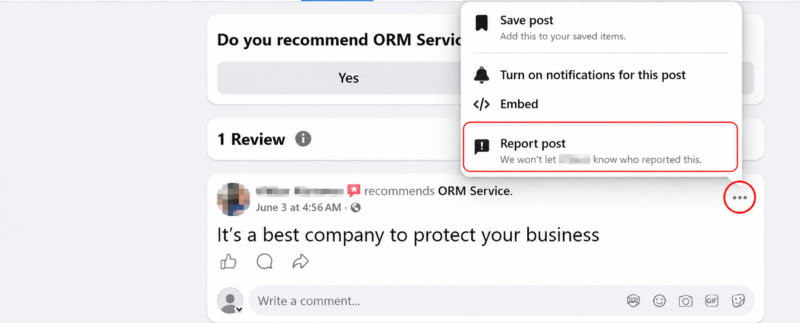
- Run down the list to the offending post and find the small cluster of three dots in its upper right corner.
- Click the dots to open the dropdown menu, then select Report post from the options; Facebook keeps your name hidden from the reviewer.
- Pick the problem type that matches from the list Facebook shows; the choices vary and can be short, so follow the on-screen instructions from there.
- Send it, and the report drops into the moderation pile at Meta.
Facebook then reviews the report and may remove the post if it breaks the standards; removal is never guaranteed. Reporting does not pull a review down on the spot. It can stay visible to others until Meta rules on it, and a negative-but-honest review usually stays for good. When a post does come down, the text and any photos go with it. You may not always receive a detailed explanation, so keep your own notes in case you want to request another review or take it to appeal.
Reply publicly and request removal
If a negative review is fair, your public reply is the best card you hold. Keep it calm and professional, thank the person for speaking up, and state clearly how you intend to set things right. Onlookers read that response more carefully than the original grumble, and a measured reply does more for your standing than any removal would.
Once it is resolved, you can quietly ask whether they will edit or take the post down. Plenty do, since the writer is the only one whose delete actually works. Tread lightly. A nagging follow-up can drag a closed complaint back into the open.
Turn off or disable reviews on your page
When fakes outpace your reports and there is no way to remove them one at a time, you can take the whole reviews section offline. One catch: this is an admin job, so you have to be managing the page, not viewing it as a visitor. Switch into the Page from the profile menu at the top right, or open Meta Business Suite. Open the Page’s settings, go to Page and tagging, and under Viewing and sharing you will find the control that decides whether anyone can view or leave reviews on your page. Turn that off and Facebook saves it for you. The official walkthrough sits in Meta’s help article.
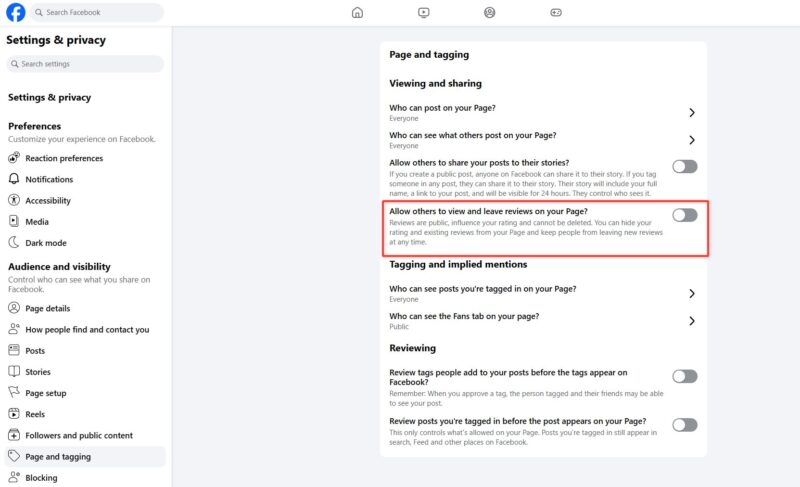
And that is it: the tab drops out of sight for everyone.
Keep one thing in mind: flipping the section off will not delete anything already there. It just hides the posts, and turning the control back on restores every one. Weigh that trade first. An empty review area can read as if you have something to hide, and to many shoppers a page with zero feedback looks weaker than one carrying a spread of praise, complaints, and the owner’s answers. For most businesses it works as a temporary step, not a lasting fix.
How to manage recommendations and page settings
Meta shelved the old five-star-only setup years back. These days, on Facebook, most feedback arrives as a recommendation: a visitor says whether they would send a friend your way and jots a few lines. Handling it well comes down to routine. Look at the page regularly, read fresh posts the day they land, and respond while they are still warm.
The rest of the controls live in your page settings. From there you can access the recommendation options, edit how the tab displays, and switch on the profanity filter so abusive wording does not sit on your wall for days. In the middle of a spam wave, some owners also restrict who can post at all. The approach that holds up is simple: small, regular check-ins. Trouble is much easier to clear before it spreads across the page than once it has.
Best practices for protecting your online reputation
The best buffer against one bad review is a regular trickle of genuine ones. Reach satisfied customers while the visit is fresh, send them a direct Facebook review link, and let sheer numbers do the work. A Facebook page carrying plenty of fresh, honest reviews shrugs off a sour note here and there.
Reply promptly, and hold the same professional tone whatever the score, one star or five. Block a recurring slot in your calendar so nothing rots out of sight. When a harsh review does turn up, treat it as a public chance to prove your service, not a blaze to stamp out. Flag only what truly breaches the rules, keep neat records, and let the bulk of honest feedback do the carrying. Run it like that, and most reputations survive a rough spell without anyone going near the delete or disable controls.



