You leave a glowing review for the taco place down the street. Next morning, it’s gone. Or a regular tells you they left you five stars last week, and you can’t find it anywhere on your page.
Don’t panic, and don’t assume someone hit delete. Most Yelp reviews that look like they vanished were never deleted at all. The software just moved them somewhere quieter, hides them from the main list, or, in a smaller slice of cases, pulled them for breaking a rule. This guide walks through why that happens, which missing reviews you can still get back, and how reviewers and businesses keep good reviews from slipping out of sight.
Why do Yelp reviews disappear: main reasons
Three things make a Yelp review vanish. The recommendation software can filter it out of the main list. A moderator or the system can remove it for a policy violation. Or the account behind it disappears, dragging its reviews along with it.
The first one covers most cases. It’s also the one people read as deletion when it isn’t. A filtered review still exists. It’s just parked in a corner of the page that almost nobody scrolls to.
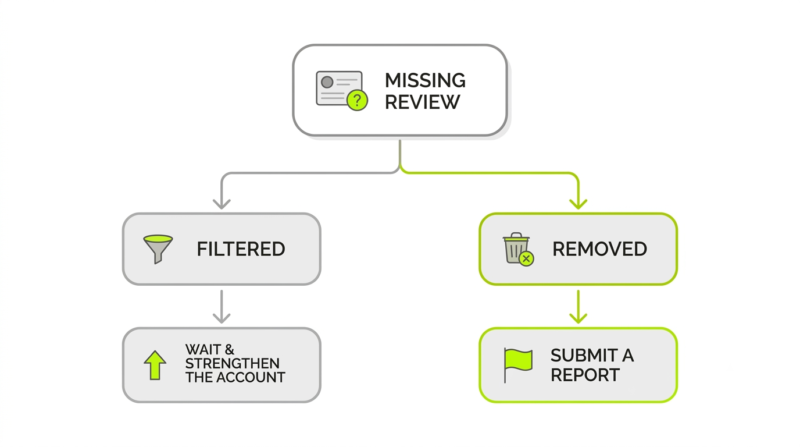
Filtering and removal are not the same problem, and they don’t share a fix. A filtered review can come back on its own once Yelp trusts the reviewer a bit more. A removed one stays gone unless you can show the removal was a mistake. Two outcomes, two very different situations:
|
Filtered (“not recommended”) |
Removed |
| Where it goes |
Hidden in the “not recommended” list at the bottom of the page |
Deleted from the page and from the author’s profile |
| Counts toward the star rating |
No |
No |
| Usual cause |
New or low-activity reviewer, suspected solicitation, thin detail |
Content guideline or Terms of Service violation |
| Can it come back |
Yes, automatically, as signals change |
Only through a successful reinstatement request |
Sort out which column you’re in first. That one fact decides whether you wait or act.
The “Not Recommended” filter and algorithm
Yelp’s recommendation software runs the whole show here, and no human at Yelp gets a vote. It reads signals: how long the reviewer has been around, how active they are, whether the words sound like a real visit or a copy-paste rave, whether the thing smells solicited or biased. Reviews added by quiet or brand-new accounts usually land in the not-recommended pile. Not because they’re fake, but because the system has nothing to go on yet. Yelp churns through a ton of reviews this way, every hour of every day.
And the call isn’t permanent. The software keeps re-checking, running a fresh evaluation as it learns more, so a review buried today can earn a second look weeks later, or lose its spot the same way. At any given moment, most reviews on the platform are recommended, which leaves a large share parked in the filtered section on a perfectly ordinary day. If a positive, honest review of yours got filtered, that stings. It’s rarely the end of the story, though, and it can flip back as the software updates what it knows about the account.
Content guideline violations and removals
Removal is a different animal. Yelp says it strips a review only when the review breaks the Content Guidelines or Terms of Service, or when the account gets shut down. So why does Yelp remove reviews outright? Narrow, specific reasons: the review isn’t a first-hand experience, it reads like an ad, it comes from a competitor or someone with a stake, or it tips into threats, slurs, or another person’s private details.
Removal is the smaller bucket, but not the rare event it used to be. Yelp’s 2025 Trust & Safety Report breaks it down: about 70% of reviews recommended, 17% not recommended, 11% removed by its team, and 2% pulled by reviewers themselves. That 11% is a steep climb from 3% the year before, after Yelp closed more than a million policy-violating accounts and its software filtered out close to half a million suspected AI-generated reviews. Not-recommended still edges out removed, though. When a review goes missing, filtering is the likelier culprit than a moderator hitting delete.
Author deletion and fake review flags
Sometimes the review is gone because of the person who wrote it, not anything in the text. Reviewers can delete their own reviews whenever they want. Close an account, or get one closed, and every review tied to it is deleted in a single sweep. Yelp also shuts down accounts it pegs as fake or abusive, removing their reviews in bulk.
Fake-review flags cut both ways. A review can get flagged and removed if Yelp’s systems, or a tip from another user, point to it being bought, swapped, or written by someone connected to the business. Here’s the catch: the same defenses that shield honest businesses from review fraud will sometimes snag a legitimate review that merely looks shady. That’s how a real review disappears with zero warning.
How to find and recover your missing Yelp reviews
Missing a review? Work out first whether it was filtered or removed outright, because only one of those is worth chasing. The check takes about a minute, and it tells you exactly which boat you’re in.
What you do next depends on who you are. A reviewer mostly needs to confirm the review still exists and is sitting in the filtered bucket. A business owner can report a wrongly removed review and ask Yelp for a second look. Neither move is a sure thing. Both are quick enough that there’s no reason not to try.
Checking your profile and the filtered section
Want to know whether a review is filtered rather than gone? Open the business page and scroll all the way to the bottom. Under the recommended reviews you’ll spot a small link, something like “[number] other reviews that are not currently recommended.” Click it. If your missing review is sitting right there, breathe easy: it was never removed. The filter just hides it from the main list and keeps it out of the star rating, which is why it stopped showing up where you expected.
Reviewers can run the check from their own side too. Head to your Yelp profile and look at your review list. If the review is still attached to your account but doesn’t appear on the business page, the software filtered it, plain and simple. If it has disappeared from your profile as well, then it was either removed over a guideline issue or lost when an account closed.
Reporting a wrongly removed review or policy violation
One thing Yelp flatly won’t do: act on a request to un-filter a review. No employee can override the software, full stop. Removal is the piece you can push on. Think a review was removed by mistake, or want a rule-breaking one taken down? File a report. Owners do it from the Reviews page in their business account; everyone else uses the “Report review” option right on the review.
A report stands a far better chance when you hand the moderators something concrete:
- The exact business name and a direct link to the review.
- A specific reason tied to a named guideline, not just “I think the rating is unfair.”
- Proof Yelp’s moderators can verify on their own, like records showing the reviewer was never a customer.
After that, Yelp’s moderating team reads the report and makes the call. There’s no formal reinstatement button and no appeal that forces their hand. The software keeps re-evaluating on its own, but a clear report is the only part of that you control, and a decision can take a while to land.
Can businesses remove Yelp reviews? What’s actually possible
Short version: no, a business can’t simply make a Yelp review it hates go away. There’s no secret menu, no fee, no employee with a delete button for hire. A business can’t legally strong-arm Yelp into pulling an honest review, and any agency promising to remove bad ones for a few hundred dollars is selling a fantasy. Yelp has taken companies to court over that exact pitch.
What is on the table is narrower, and legitimate. Report reviews that break the rules and let the moderators evaluate them. Reply to inaccuracies, in public or in private. Earn the kind of reviews the filter favors in the first place. And if you’re staring down flat-out defamation or false statements of fact, there may be routes outside Yelp, but that’s lawyer territory, not a button you click.
Preventing review removal: best practices for reviewers and businesses
The cleanest way to deal with a disappearing review is to keep it from getting filtered or removed at all. For reviewers, that mostly comes down to looking like a real, established member of the Yelp community instead of a drive-by account. Make sure each review describes a recent, first-hand visit, and skip writing one for a business you haven’t set foot in.
A few habits make reviews stick:
- Fill out the Yelp profile properly: a photo, a real name, a location.
- Stay active. Post reviews regularly instead of dropping one and then ghosting the platform for a year.
- Add real detail from the visit, not a one-line “great place” or “never again.”
None of it is a guarantee. Each piece just hands Yelp’s software one more reason to trust you.
Businesses have less leverage, and should be careful what they wish for. The number-one own goal is asking customers for reviews in the first place. Yelp’s software actively hunts for solicited reviews and tends to file them as not recommended, so the gushing review your happy customer wrote at your request may never see daylight. Offering a discount or a free dessert for a review is worse: it breaks the guidelines and can slap a warning on your page. Better route: deliver a good experience, make yourself easy to find on Yelp, and answer the reviews you do get. Learn the guidelines once and you’ll stop most removals before they start.
Yelp support resources and where to get help
When the self-checks don’t settle things, Yelp’s own pages beat any third-party guesswork. The Support Center spells out where reviews go and why. The Trust & Safety site digs into how the recommendation software and the moderating process work. Reviewers should start with the “Where is my review?” article; owners want the business support section on reporting and replying.
Walk in with the right expectations, though. Support can confirm policy and look into a removal you’ve reported. It can’t un-filter a review or lean on the algorithm for you. Filtered review? Your best “support” is patience plus the account fixes above. Removed by mistake? A tight, evidence-backed report is the move. For ongoing tracking, a business can watch which reviews are recommended versus not from the Yelp business dashboard, and keep its own database of customer feedback so nothing blindsides it later.
Managing this on more than just Yelp?
Reviews get filtered, vanish, or cross the line on Google, Facebook, Tripadvisor, and more, and checking every platform by hand burns through your week. ORM Service pulls all of them into one dashboard, so a filtered or missing review surfaces the moment it happens. And when a review does break platform policy, a dedicated team of analysts and lawyers documents the violation and runs the dispute for you, instead of leaving you to puzzle out each site’s reporting flow. Book a demo.
Final thoughts and key takeaways
Hold onto this: most “vanished” Yelp reviews aren’t deleted. They’re filtered. Once you know whether a review got shuffled into the not-recommended section or removed outright for a violation, the right move picks itself: wait and build up the account for a filtered one, file a clean report for a removed one. A business can’t buy or bully a review into disappearing. It can report the real violations and earn the reviews the filter rewards.
Get the fundamentals right and the headaches shrink. Complete, active accounts get filtered less. Honest reviews tied to real visits stick around longer. And asking for reviews? It backfires more often than it pays off. Yelp reviews disappearing is usually the system doing its job, not a bug, and the reviews that end up mattering most are the ones that never needed a trick to stay up.



