Most businesses that raise their score do it the unglamorous way: they ask well, ask often, and reply to everyone. The nine tactics here are the ones that actually move the number, and every one of them stays on the right side of the rules.
What Is the Google Star Rating System?
Your public score is a running average of every score your profile has earned, shown to one decimal place next to your name in Search and Maps. The rating system looks simple from the outside: a single number, recalculated each time a new one lands. That averaging is automatic, so there is no star rating calculator you can quietly adjust from your dashboard.
Raising that number is the goal here, but higher isn’t the same as perfect. A wall of five stars can actually look less trustworthy than a steady 4.6 or 4.7, which is a separate topic worth its own read.
Why Improving Your Google Star Rating Drives Business Growth
A better score does more than look good. In most cases it lifts the things that pay the bills: more calls from the local pack, more clicks to your site, more walk-ins. Shoppers scan the Google reviews stars before they read a word, and a fuller, fresher set of ratings gives them a reason to choose you over the place two doors down.
Growth here is fueled by volume and recency, not by one glowing comment. The businesses that climb fold the ask into how they close out a job, rather than running it as a campaign they forget a month later.
9 Tactics to Increase Your Google Star Rating
Every tactic below is something you can start this week, and none of them cross the line: no incentives, no hand-picking who you ask, no paid ratings. Google strips out incentivized and selectively solicited reviews, so the honest route is also the one that lasts.
Optimize your Google Business Profile completely
A half-finished profile costs you before a customer ever finds it. Fill in your categories, services, hours, photos, and contact details so the listing lines up with what people actually type into search. The more complete your business info, the wider the range of queries the profile can surface for.
Ask satisfied customers for reviews at the right moment
Timing beats volume. The strongest moment to ask sits right after a good outcome, while the customer is still pleased: at the counter, on delivery, or the minute you have fixed their problem. Ask everyone who had an ordinary visit, not just the delighted few. Screening for only your happy customers is gating, and the policy treats it as manipulation.
Use reputation management tools to streamline feedback
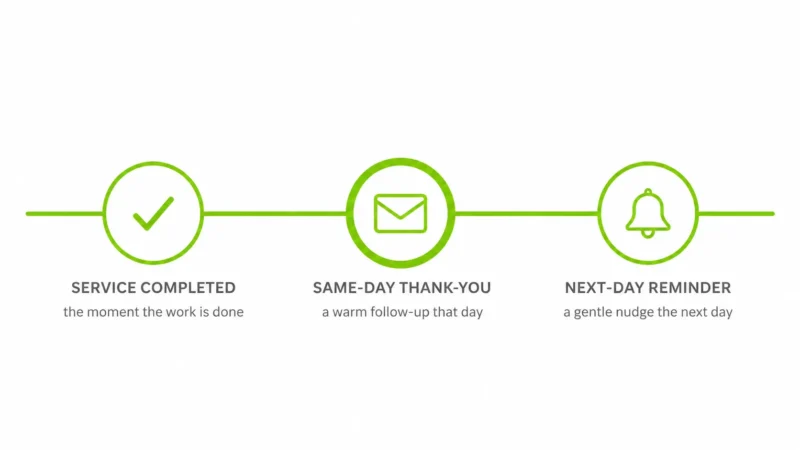
Manual follow-up falls apart once you are handling more than a handful a week. A reputation management tool fires off the request, tracks who has already left feedback, and pings you the moment something new posts, so replies go out fast. A provider like ORM Service sits here: automated review requests and a single dashboard for everything coming in, so the whole routine runs without a spreadsheet.
Make leaving a review effortless (short link or QR code)
Every extra tap loses people. Grab the short link customers use to rate you, turn it into a QR code, and drop it where they already are. Each new post nudges your Google review stars up a notch, and the aim is one tap from happy to posted.
Respond to every review, positive and negative
Your replies are public, and the next reader weighs you by them. Thank people for the positive ones in a sentence or two; answer the critical ones calmly, with a fix or a clear next step. A professional, human response does more for your online reputation than a defensive paragraph ever will, and it tells anyone browsing that the profile is looked after.
Train your team to request reviews in person
The strongest ask is face to face, from the person who did the work. Hand your team one simple line to use and a card or link to pass along. Keep it clean: staff can invite feedback, but the moment anything changes hands in return, even a small perk, the whole profile is exposed under that same policy.
Send a polite follow-up reminder within 24 hours
People mean to leave feedback and then life gets in the way. One short, polite nudge the next day wins back a solid share of them. Send it once. A second and third chase reads as pressure and rarely earns anything.
Add review prompts to receipts, emails, and thank-you pages
Put the ask where people already look. A line on the receipt, a footer in your email, and a small prompt on the thank-you page after checkout keep requests trickling in without nagging. Reach back to past clients as well: a short, kindly worded note to recent buyers can surface reviews you never thought to chase.
Monitor and flag reviews that violate Google’s policies
Not every one-star is a fair one. Spam, fake posts, and entries from people who were never customers can be reported straight from your profile, and anything that breaks the content rules comes down. Flag those, then leave the rest alone, since a few honest criticisms are what make the whole set read as real.
Best Practices for Managing Google Star Reviews
Getting more ratings is a habit, not a one-off push. Ask on a steady cadence so fresh feedback arrives week after week, because recency counts nearly as much as the total. A profile that pulled in fifty reviews two years ago and nothing since looks stale beside a rival adding two a week.
Replies deserve the same care. Reuse a template and it shows; readers spot the copy-paste at a glance. Vary the wording, name the specific thing the customer mentioned, and keep the tone professional. Make sure the basics stay current too, since hours, photos, and business info that drift out of date quietly erode trust.
The aim is plain: a profile that reads as an active, well-run seller with a record of service excellence, refreshed as often as possible.
Common Mistakes That Hold Back Your Google Star Ratings
Most stalled ratings trace back to the same handful of habits. The biggest is inconsistency: a burst of requests, then months of silence. Reviews lose weight as they age, so a profile that stops asking quietly drifts downward. The second is gating, chasing only your happiest customers, which reads as manipulation and can draw a penalty.
Buying reviews is the expensive mistake. It feels fast, but Google’s systems catch the unnatural spikes, wipe the fake ratings, and can suspend the whole profile. Ignoring criticism hurts more quietly: one unanswered one-star tells every future reader you are not paying attention. None of the fixes above costs money, only a routine you actually keep.
Using Google Star Ratings to Strengthen Local SEO
Ratings do more than sway a shopper mid-decision; they quietly shape where you land in local search. The local algorithm sorts results on three things: how well you match the query, how close you are, and how prominent you look. Reviews feed that third one. Google’s own local-ranking guidance puts it plainly: the number of reviews you hold, paired with your average score, can lift your spot in the pack.
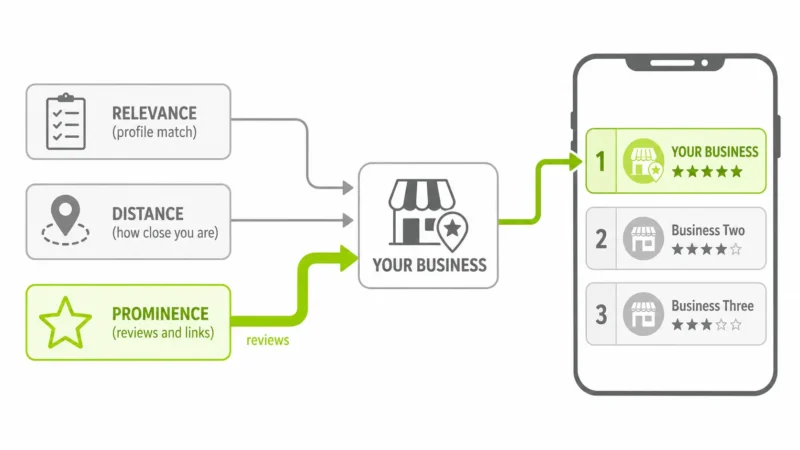
How reviews feed the local pack and the “prominence” signal
Prominence is the algorithm’s shorthand for how known and trusted a place looks. Inbound links and web mentions feed it, and so does your rating history, both the count and the average. A business sitting on a stack of recent, positive scores reads as prominent, and the local pack, the three-result box wedged atop a local search, tends to hand those businesses the top spots.
Why review recency and volume affect local ranking
A lone five-star from three years back does little. Local ranking leans toward fresh signals, so a slow, steady drip of new ratings usually outweighs a big total that stopped growing. Volume still counts, since a handful of scores is easy to skew and hard to trust. The pairing, enough of them and recent, is what moves the needle.
Using review content and keywords to support relevance
Relevance is how closely your profile matches a given search, and the words inside customer feedback quietly help. When customers name the service they bought or the neighborhood you work in, that language tells Google what you do and where you do it. You cannot script what people write, but you can make it effortless for happy customers to describe the visit in their own words. The same routine that lifts your score also sharpens relevance, which is why this is ongoing work, not a one-time push. If you would rather not run it by hand, ORM Service’s review-management service handles the requests and the monitoring, and the rest is on your team.



